How to Record Stripchat with CaptureGem
CaptureGem records public Stripchat shows on Windows, macOS and Linux, and you don't need a Stripchat account.
- Works on
- Windows, macOS and Linux
- Link format
https://stripchat.com/model_username
Install CaptureGem
Download CaptureGem for Windows, macOS or Linux and open the desktop app. Stay on the latest version. From 2.14.11, CaptureGem switches to a backup video server when your internet provider blocks Stripchat's usual one; from 2.14.13, it recognizes Stripchat's regional addresses.
Copy the room link
Open the model's room and copy the address from your browser, such as https://stripchat.com/model_username. Links from strip.chat, stripchat.global, stripchat.ooo, stripchat.cam and stripchat.org work too, including language subdomains such as de.stripchat.global.
If a username ends in a partner suffix such as @xh, keep the suffix: CaptureGem needs it to find the model. From 2.14.8, CaptureGem still finds a model under their old name after they change their username.
Add the stream
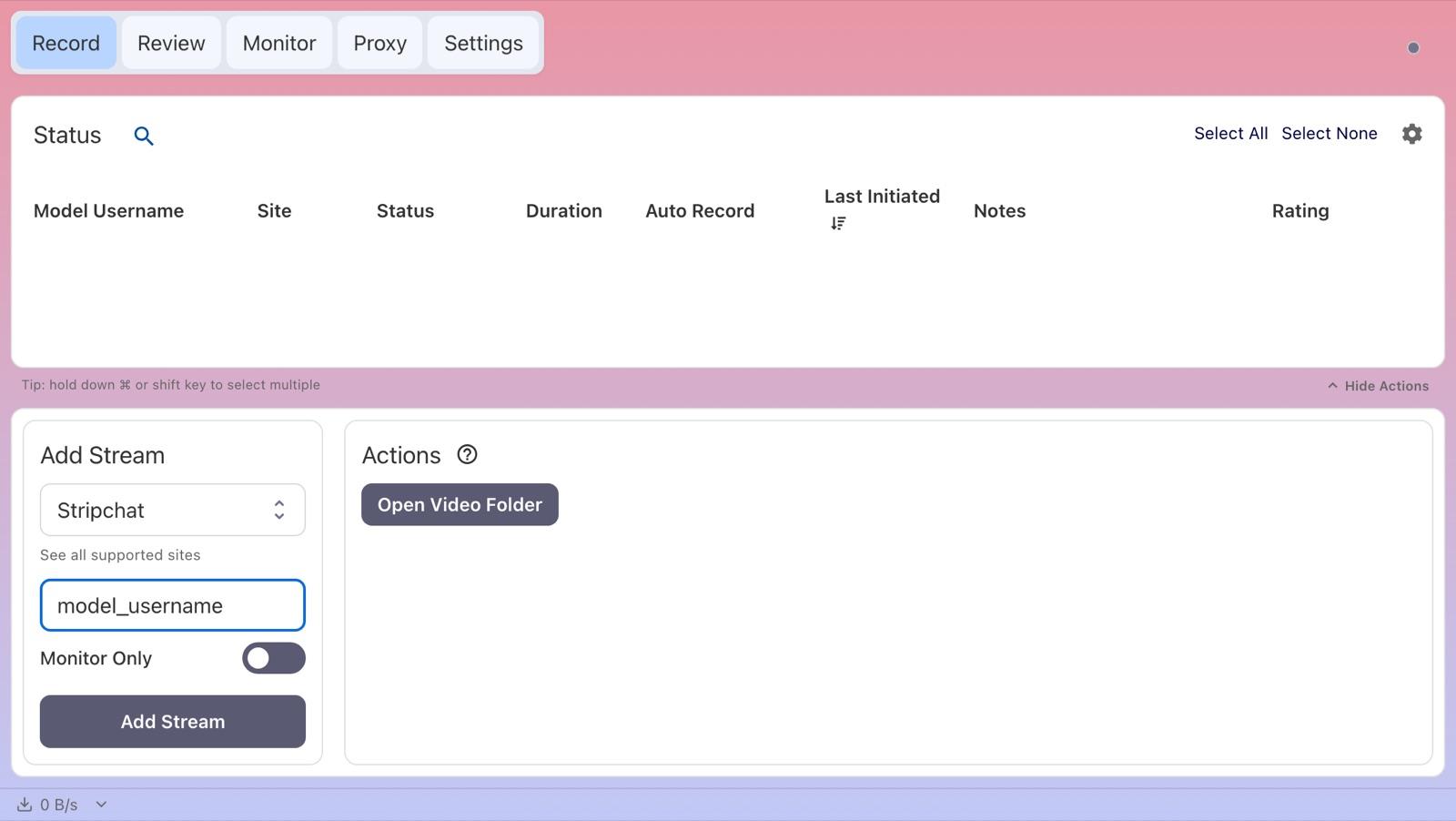
On the Record tab, paste the link into Enter URL or Username in the Add Stream panel, and CaptureGem selects Stripchat for you. You can also choose Stripchat under Select Website and type just the username.
Leave Monitor Only switched off so the stream is saved, then click Add Stream.
For a model's VR show, choose StripchatVR instead. A pasted Stripchat link always selects regular Stripchat; see the StripchatVR guide.
Record the show
When the model is in a public show, the status switches to Recording within a few seconds. If not, the Status column tells you why:
- Private: the model is in a private, group, ticket or other non-public show.
- Offline: the model is offline or idle, or their camera isn't available.
- Duplicate username: the model is already in your list under another name, such as their current username.
- Errored: the room couldn't be checked or recorded.
Hover over a status for more detail, including the reason behind an Errored status.
Find your recording
When a recording ends, CaptureGem processes it into a finished video file. Long recordings can take a little while.
- Open the Review tab to play, trim, tag or delete the recording, or click Open Video Folder on the Record tab.
- Recordings are saved as MP4 files by default.
- With Premium, each file is up to 60 minutes long by default, and auto-record starts the next file straight away.
- The save location, the file length (Cap Video Segments at Duration (Minutes)) and the file container can all be changed in Settings.
Free version and auto-record
- Free: saves up to 5 minutes per recording and lets you add up to 10 models. A model is recorded when you add or start them while they're live, so if they were offline, start the recording again later.
- Premium: removes those limits and adds auto-record. Select the model on the Record tab, choose Modify Auto Record under Actions, then pick Record Always. CaptureGem then records whenever the model comes online and restarts after a disconnect. Compare plans.
- To auto-record every model you add from now on, turn on Auto Record All Newly Added Models in Settings (Premium).
The Monitor tab shows live previews of everything you're recording.
Stripchat notes and troubleshooting
- "Stream not available, offline, or blocked due to geographical restrictions"The model may have blocked viewers from your country. If the show doesn't play in your browser either, CaptureGem can't record it from where you are.
- Stripchat blocked on your networkIn Settings > Advanced Settings, Stripchat API Domain switches between strip.chat (the default) and stripchat.com; try the other one if checks keep failing. Use cURL for Stripchat Requests is on by default, and turning it off makes CaptureGem use its built-in browser instead, which can be more reliable in some countries.
- Video server blockedFrom 2.14.11, CaptureGem notices a blocked video server and moves to a backup by itself. If Stripchat refuses one quality, recording carries on at the next best quality.
- QualityCaptureGem records the best quality Stripchat offers. To save bandwidth and disk space, set a lower Stripchat limit under Max Resolution Per Site in Advanced Settings.
- Regional link added as Other SiteVersions before 2.14.13 could add regional links as Other Site, which stays Offline. Remove that entry and add the model again with Stripchat selected.
- Private showsCaptureGem records public shows. If you can watch a private show in your own browser, Premium's Proxy feature can save it. See the proxy guide for Windows, macOS or Linux.
If a recording keeps failing, update CaptureGem, check that the stream plays in your browser, and ask in the CaptureGem Discord community. Premium members can also send a failed recording to support.